If your exhaust valve controller won’t connect, the cause is usually power, pairing or interference, not a dead controller. Start with the cheap checks: the remote’s battery, the ignition cycle, the phone’s Bluetooth cache, and the ground and power leads at the control box. Only after those pass should you suspect the box, the harness or the valve actuators themselves.
This guide walks through the problem in the order a technician would. It covers remote-fob controllers, app-based Bluetooth controllers and OBD or CAN bus plug-in units, and it explains what a fault code does and does not tell you.
TL;DR
- Most “not connecting” complaints come from low power, a lost pairing or signal interference, not failed hardware.
- Replace the remote’s battery first, then power-cycle the ignition and re-pair using the maker’s sequence.
- For app controllers, toggle Bluetooth, force-close the app and restart the module by cycling the ignition before you blame the box.
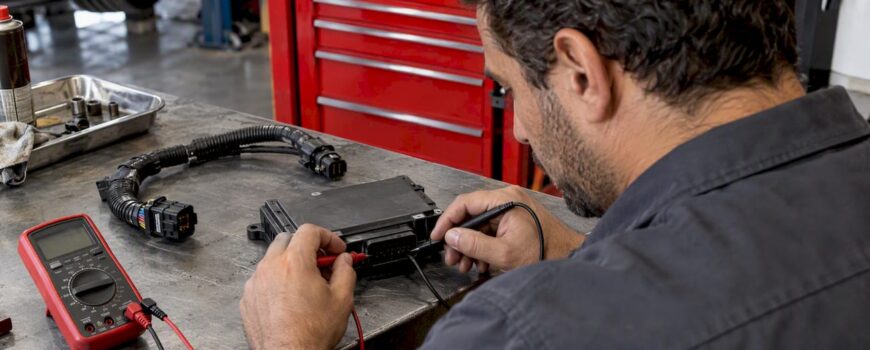
- Check the power and ground leads with a multimeter before you replace anything.
- A fault code such as P0078 points to an electrical problem in a valve control solenoid circuit, so read the wiring diagram before you test.
Table of Contents
- Start by identifying what kind of controller you have
- Five-minute checks before you touch a wire
- Remote fob controllers: battery, pairing and hard reset
- App-based controllers: Bluetooth cache and module restarts
- Power and ground: the quiet cause
- Signal interference: when the link drops at odd moments
- OBD2 and CAN bus units
- It connects, but the valves don’t move
- Reading the fault codes
- Our perspective
- Quick diagnosis table
- When it’s time to replace, and what to look for
- FAQ
- Sources
Start by identifying what kind of controller you have
The word “connecting” means different things on different systems, so the fix depends on which one you own.
| Controller type | What “not connecting” looks like | Most likely cause |
|---|---|---|
| Remote fob (RF) | Buttons do nothing, valves stay put | Dead remote battery, lost pairing, weak supply to the box |
| App / Bluetooth | Phone can’t find the module or drops the link | Stale Bluetooth cache, app glitch, module not rebooted |
| OBD2 / CAN bus plug-in | Unit powers up but no valve response | Poor connector seat, wrong adapter, harness fault |
| Factory-integrated (drive mode button) | Valves ignore your mode selection | Unplugged actuator, failed relearn, wiring |
If you aren’t sure, look at the box. A small unit with a wire to the valve motors and a separate key fob is a remote system. A unit with an antenna-free housing and a phone app is Bluetooth. A unit that plugs into the diagnostic port is OBD or CAN bus.
Our troubleshooting guide for valve control exhaust systems covers the broader set of symptoms if yours doesn’t fit neatly into one row.
Five-minute checks before you touch a wire
Most fixes happen here. Run through these in order.
- Turn the ignition fully off, wait a minute, and start again. Power-cycling is the universal first step for initial connectivity problems. Many controllers only run their pairing routine at power-up.
- Replace the remote’s battery with a fresh one of the same type, even if the old one “tests fine.” Coin cells under load can sag below what the transmitter needs.
- Check that the car’s battery is healthy. A weak battery or a recent jump start can drop the supply voltage low enough to upset a controller.
- Look at the connectors. Unplug and reseat the main harness at the control box. Look for bent pins, green corrosion or moisture.
- Check fuses. If the controller is powered from a fuse tap, confirm the fuse is intact and the tap sits fully in its slot.
- Confirm the controller has an LED or click on power-up. No light means a power problem. A light with no valve response means a different problem, covered below.
That last step splits your diagnosis cleanly in two: no power, or power but no link.
Remote fob controllers: battery, pairing and hard reset
Pairing between the fob and the box is stored in the box’s memory. It can be lost during a battery swap or a low-voltage event, which is why a controller that worked yesterday can suddenly ignore its remote.
The general recovery sequence for remote-based units looks like this:
- Disconnect power to the controller, or turn the ignition off.
- Open the control unit and find the small physical reset button, if your model has one.
- Hold it for about 10 seconds to clear the memory.
- Restore power.
- Follow the manufacturer’s pairing sequence for the fob. On many units that involves pressing the On and Off buttons on the remote in a set order.
Because sequences differ between brands, follow the printed instructions that came with your unit rather than a forum post. If you no longer have them, contact the seller with your order number.
A few other remote-specific points:
- Range and line of sight. Test with the remote a few feet from the box, not across the lot. If it works up close and fails at distance, you have an antenna placement or interference problem, not a pairing one.
- Box location. A control box tucked behind metal panels, near the battery or under a pile of cargo can lose signal. Mounting it somewhere with a clearer path often helps.
- Operating modes. Most remote controllers offer open, closed and automatic modes. Automatic mode usually needs an additional input, such as a signal from the car. If the open and closed buttons work but automatic doesn’t, the remote link is fine and the input is missing.
App-based controllers: Bluetooth cache and module restarts
With app-based units, the “not connecting” message is frequently a phone problem. Cached Bluetooth data and a stuck app session are common culprits, and they get blamed on the hardware far too often.
Try this sequence:
- Force-close the app.
- Turn your phone’s Bluetooth off, wait 10 seconds, and turn it on.
- Power-cycle the ignition so the module restarts.
- Open the app and scan again.
- If it still fails, remove the module from your phone’s saved Bluetooth devices and pair it as new.
Two more things to know. First, some app controllers need a unique code to re-pair, and they may expect the module to be in a diagnostic or service state when you do it. Check the instructions for that. Second, firmware matters: early app-based units have been reported to fail initial pairing until a firmware update was applied, so update the app and the module firmware before concluding anything is defective.
If you recently updated your phone’s operating system, check that the app still has Bluetooth and nearby-device permissions. Updates sometimes reset them silently.
Power and ground: the quiet cause
A controller can light up and still be starved. Low supply voltage, a poor ground or a shared ground with a noisy accessory can make the box reboot, drop pairing or refuse to talk.
What to check with a multimeter:
- Supply voltage at the controller’s power input. With the engine off you should see roughly battery voltage. If it’s far lower than at the battery terminals, you have a voltage drop in the wiring or a bad tap.
- Ground continuity. Set the meter to continuity or resistance and test from the controller’s ground lead to a clean bare-metal chassis point. A solid ground should read very low resistance.
- Ground point quality. Grounding to painted metal, a plastic-coated bracket or a rusty bolt is a classic cause of intermittent behavior. Sand to bare metal, tighten, and protect the joint.
- Adapter supply. If your system uses a separate power adapter for the valve motors, confirm it delivers the right DC voltage under load.
Owners who have chased this on enthusiast forums often report that proper grounding turned out to be the problem. It is the cheapest fix on this page and the one most often skipped. Our guide to how exhaust valve wiring works shows where power, ground and signal leads typically run.
Be careful with the factory side. The right test path depends on whether a circuit is power-side or ground-side controlled, and ASE Certified Master Technician Dan Weller notes that misreading the control method can lead to wrong tests and potential damage to the engine computer. Identify the method on the wiring diagram before probing any factory connector.
Signal interference: when the link drops at odd moments
Radio-based controllers share spectrum with key fobs, tire pressure sensors, aftermarket alarms and phones. If the link works in your driveway and fails on the highway, or only when your phone is in a certain pocket, suspect interference.
Things that commonly cause it:
- Control box mounted against large metal surfaces or beside the battery.
- Wiring for the antenna or signal lead routed alongside ignition or high-current cables.
- Other aftermarket electronics, such as dash cams or alarms, packed around the box.
- Window film that contains metal. Metalized window tint interference can weaken signals passing through glass, which matters if your remote or phone works from inside the cabin.
To test, move the box a few inches, separate the signal lead from power cables, and repeat the test. If the symptom changes with the move, you’ve found the category.
OBD2 and CAN bus units
Plug-in controllers draw power and data from the diagnostic port. They are convenient, but the failure modes are specific.
- Seating. The OBD plug can sit slightly loose, especially with a heavy cable pulling on it. Reseat firmly and secure the cable.
- Adapter compatibility. The adapter must match the vehicle’s protocol. A wrong adapter powers up but never reads the car.
- Extra power leads. Some aftermarket-valve versions need an additional power cord to the controller. If you skipped it, the unit may light up but not drive the valves.
- Gateway modules. On newer vehicles, security gateways can limit what plug-in devices see on the bus. That’s a vehicle-specific matter to confirm with the seller.
We go deeper in setting up OBD integration for an exhaust valve system and in our list of six checks to avoid fault codes with CAN bus exhaust control.
It connects, but the valves don’t move
If the remote or app is happy and you hear nothing from the valves, the problem has moved downstream.
- Actuator plugs. After an install or an ECU relearn, make sure the wiring harnesses are seated in the electronic actuators. A relearn that didn’t take is often a loose plug.
- Actuator wiring near heat. Harnesses touching exhaust components can burn or short. Check routing, heat shielding and any chafe points.
- Motor function. Disconnect the actuator and test the motor per its specification. Our technician’s guide to exhaust valve motor testing shows the steps.
- Mechanical binding. A valve flap seized by carbon or corrosion will stall a perfectly healthy motor. If it sticks closed, see our five checks for an aftermarket exhaust valve that stays closed.
Installation routing is the hard part on many cars. Reaching from the trunk or battery area to the valve actuator under the car means long runs of wire, and a long run with a weak splice is a common source of intermittent faults. Use proper crimps or solder with heat shrink, and loom the harness.
Reading the fault codes
If your dash shows a warning light, scan the car. Codes in the P0078 family relate to the exhaust valve control solenoid circuit on Bank 1, which is the side of the engine with cylinder number 1.
- P0078 indicates an electrical problem in that circuit. Poor connections, corroded terminals, a faulted solenoid or a short in the harness can all cause it, and it typically lights the check engine lamp.
- P0027 is the related range/performance code. Experts recommend addressing the solenoid electrical circuit before diagnosing mechanical range issues.
A critical point: these are generic OBD-II codes for variable valve timing on the engine. They describe the factory solenoid circuit, and they are not necessarily about your aftermarket exhaust valve. Don’t assume the code and the controller issue share a cause. If both appeared after an install, though, a pinched or mis-spliced wire is a sensible first suspect.
A solenoid typically measures around 1 ohm or less. A reading well above that, or an open circuit, points to faulty wiring or solenoid internals. As noted above, check the wiring diagram before testing, since the wrong approach can damage the computer. Our guide to exhaust diagnostic tools for valved systems lists what’s worth owning.
Our perspective
We see the same pattern again and again: owners treat a connection problem as a hardware failure, order a replacement and get the identical symptom. In our experience, the fix is almost always upstream of the box. The remote’s battery, the pairing memory, a phone’s Bluetooth cache, a poor ground, or a weak supply.

That is why we point people to a fixed order of checks. Power first, then pairing, then interference, then wiring, and only then components. It costs nothing to start at the top, and it saves you from paying for a part you didn’t need.
We also recommend good habits at install time. Choose a clean ground point, route the signal lead away from high-current cables, keep the control box out of metal pockets, and write down your pairing steps. Our explanation of the exhaust controller module’s role shows why the box depends so heavily on a stable supply and a clean signal. If a customer has done all of this and the unit still won’t connect, that is the point at which we want to hear about it.
— Info
Quick diagnosis table
| Symptom | Check first | Then |
|---|---|---|
| Remote does nothing, box has no light | Fuse, power lead, ground | Multimeter at the box input |
| Remote does nothing, box has light | Remote battery, pairing | Hard reset and re-pair |
| Works close, fails at distance | Box location, interference | Move the box, separate cables |
| App can’t find the module | Phone Bluetooth, app restart | Cycle ignition, re-pair, update firmware |
| Connects, valves silent | Actuator plugs, relearn | Motor test, harness inspection |
| Check engine light with P0078 | Wiring diagram | Solenoid circuit resistance |
| Works then drops at random | Supply voltage, ground | Reroute leads, check splices |
When it’s time to replace, and what to look for
Replace the controller when it has stable power and ground, fresh remote batteries, a clean reset and re-pair, no interference, and it still fails to respond. At that point the box itself is the likely culprit.
When you shop, look for genuine parts and clear compatibility for your exact model and year. We carry exhaust parts, accessories including controllers, and downpipes for European and luxury performance cars, all sold direct from authorized manufacturers. If you’re deciding on a whole new system, our performance exhaust buyer’s guide compares the options by features. Send us your vehicle details before you order and we’ll help you match the right controller.
FAQ
How do I reset an exhaust valve remote?
On most remote-based controllers you open the unit, hold the small reset button for about 10 seconds to clear the memory, then restore power and re-pair the fob. The pairing sequence, often a combination of On and Off presses, varies by brand, so follow your manual.
Why did my controller stop working after a battery change?
Pairing can be lost during a battery swap or a low-voltage event, because the box’s memory depends on a steady supply. Re-pair the remote after a hard reset. If the car’s own battery was disconnected, also check the controller’s ground and power connections.
Why won’t my app-based controller connect to my phone?
It is often a cached Bluetooth issue on the phone. Toggle Bluetooth, force-close the app, and restart the module by cycling the ignition. If that fails, re-pair as a new device and check for firmware updates.
What causes exhaust valve failure?
Common causes are poor wiring, heat damage to harnesses, corrosion at connectors, a failed actuator motor, and carbon or rust binding the valve flap. Many reported electrical shorts come from harnesses routed too close to hot exhaust parts.
What does P0078 mean?
It means an electrical fault in the exhaust valve control solenoid circuit on Bank 1. It is a generic OBD-II code tied to the engine’s variable valve timing, so check the vehicle’s wiring diagram and test the circuit before replacing parts.
Sources
- P0078 Exhaust Valve Control Solenoid Circuit (Bank 1), OBD-Codes.com
- P0027 Exhaust Valve Control Solenoid Circuit Range/Perf. B1, OBD-Codes.com
- Metalized Tint Interference: Causes and Practical Fixes